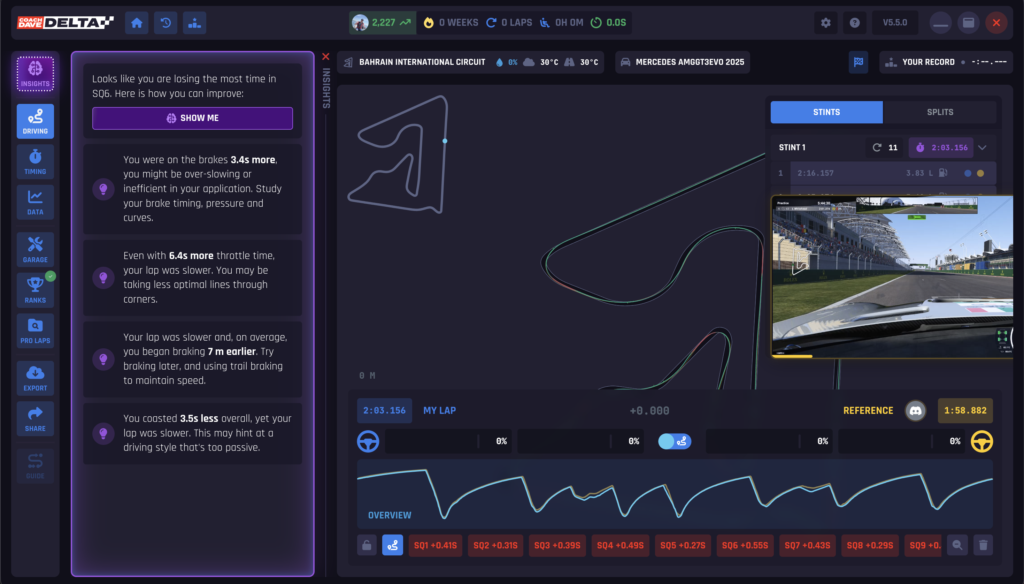
Auto Insights is Delta’s AI coaching feature that analyses your driving corner by corner and tells you exactly where you’re losing time. Instead of scrolling through telemetry traces trying to interpret the data yourself, Auto Insights breaks every corner into four phases for you – braking, entry, apex, and exit – and shows you what’s costing you lap time and how to fix it.
Auto Insights is included in your Delta subscription at no extra cost and works with any Delta-compatible sim.
What is Auto Insights?
Auto Insights is an AI-powered analysis tool that compares your driving to a reference lap (either a pro driver’s lap from the Delta leaderboard or a teammate’s lap) and identifies the specific phases of each corner where you’re losing time.
Instead of telling you “you’re 0.8 seconds slower in sector 2,” Auto Insights tells you “you’re braking too early into turn 5, carrying too little speed through the entry of turn 8, and getting on the throttle too late exiting turn 11.” That’s the difference between knowing you’re slow and knowing why you’re slow.
How to Access Auto Insights
In a Live Session
- Open Delta and connect to a live session in any supported sim.
- Complete your out-lap. Auto Insights begins tracking automatically from your first flying lap.
- Drive a few laps to give the AI enough data to analyse.
- Return to the garage and open the Analysis panel on the left-hand side of Delta.
- Auto Insights will display a corner-by-corner breakdown of your performance compared to the reference lap.
The recommended workflow is: drive a few laps, come back to the garage, review Auto Insights, identify one or two areas to focus on, go back out and work on those specific corners. Repeat. This focused approach accelerates your improvement far faster than just doing laps and hoping for the best.
From Session History
- Open Delta and go to your Session History.
- Select any past session.
- Open the Analysis panel.
- Auto Insights will display the same corner-by-corner breakdown, allowing you to review sessions you’ve already completed.
The Four-Phase Analysis
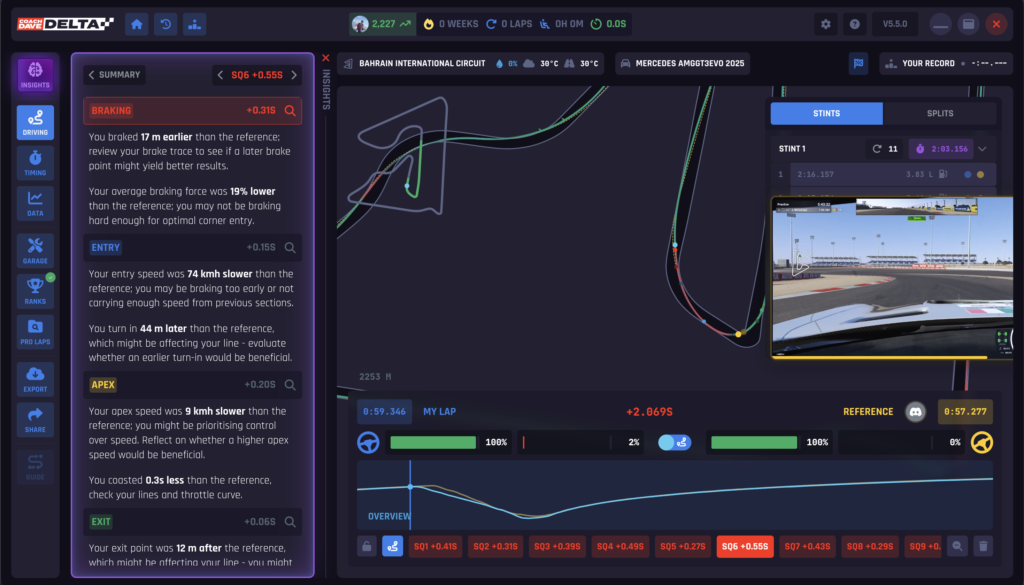
Auto Insights breaks every corner on the circuit into four distinct phases. Each phase is analysed individually against the reference lap so you can see exactly which part of your cornering technique needs work.
Braking
How you brake into the corner. Auto Insights evaluates whether you’re braking too early or too late compared to the reference, how hard you’re braking initially, and how you release the brake as you approach the turn-in point.
Entry
How you approach and enter the corner. Auto Insights assesses your entry speed, whether you’re carrying too much or too little, and how your car is positioned as you turn in. Carrying too little speed means time lost on entry. Carrying too much means you’ll compromise the apex and exit.
Apex
How you drive through the apex of the corner. Auto Insights checks your minimum speed, your line through the apex, and whether you’re positioned to get the best possible exit. Being offline at the apex costs time both at the apex itself and all the way down the following straight.
Exit
How you get back on the throttle and accelerate out of the corner. Auto Insights measures how early and how aggressively you apply the throttle, and whether you’re maximising your exit speed. A poor exit doesn’t just cost you time in the corner, it costs you time everywhere between that corner and the next braking zone.
Understanding the Results
Auto Insights uses a colour-coded system to make it immediately obvious where your biggest time losses are:
- Green: You’re performing well in this phase. Close to or matching the reference.
- Red: You’re losing significant time in this phase. This is where to focus your attention.
Start with the red areas. These are your biggest gains. Fixing one red phase in one corner can be worth several tenths of a second, and the improvement carries over to every lap you drive at that track.
You don’t need to fix everything at once. Pick the one or two corners where Auto Insights shows the most red, focus on those in your next run, then come back and review again.
Using Auto Insights with Other Delta Features
With Reference Laps
Auto Insights compares your driving to whichever reference lap you’ve selected. This can be a pro driver’s lap from the Delta leaderboard, a teammate’s lap, or any shared lap. Choose a reference that’s faster than you but within reach, comparing yourself to an alien when you’re 3 seconds off pace will flag everything as red, which isn’t useful.
With Video Analysis
If the reference lap has Video Analysis available, you can combine both features. See the AI’s corner-by-corner breakdown alongside synced onboard video of the pro driving that exact corner. Auto Insights tells you what’s wrong. Video Analysis shows you what the correct version looks like.
With Share & Compare
Auto Insights is fully integrated with Delta’s Share & Compare functionality. When you share your session data with a teammate or coach, they can see the AI’s insights alongside your telemetry. This means a coach or more experienced driver can give you precise, data-driven feedback based on what Auto Insights has already identified.
Which Sims Are Supported?
Auto Insights works with every sim that Delta supports, including ACC, iRacing, Le Mans Ultimate, Gran Turismo 7, Automobilista 2, AC Evo, and AC. It works in any session type – practice, qualifying, or race – and with any reference lap.
Tips for Getting the Most from Auto Insights
Drive a few laps first. Auto Insights needs at least 2-3 clean laps to give you accurate analysis. One messy lap with traffic or a spin will skew the results.
Focus on one or two corners at a time. Don’t try to fix ten things at once. Pick the corners with the biggest losses, work on those, then re-analyse.
Use it every session. Auto Insights isn’t just for when you’re learning a new track. Use it on tracks you already know – you’ll be surprised how much time is hiding in corners you thought you had figured out.
Compare against the right reference. Pick a reference lap that’s 0.5-1.5 seconds faster than your pace. Too close and the differences are marginal. Too far and everything shows as a loss, making it hard to prioritise.
Garage, review, drive, repeat. The fastest way to improve is the loop: drive a few laps, garage, check Auto Insights, identify one focus area, go back out and work on it. Each cycle should bring you closer to the reference.